· Create A Pro Website
OpenClaw doesn't have a pricing page. There's no “Pro” tier, no seat license, no upgrade button anywhere in the app. The project's official overview says the whole product is MIT licensed with no separately licensed enterprise edition. So the direct answer to “what does OpenClaw cost” is: the software itself costs $0.
But that's not the same as “running OpenClaw costs nothing.” The project's documentation separates the free software from the model access, hardware, and optional hosting around it. Those inputs—not a made-up OpenClaw subscription—are what the scenarios below compare.
Quick Answer
The software can cost $0, but the operating cost belongs to the model, hosting, and maintenance choices around it. Price the complete workflow, not the repository download.
OpenClaw the software is free. What you pay for comes from three places, and you don't have to pay for all three:
- The AI model you connect it to. Use a currently supported account or CLI login, pay as you go through an API, or run a local model without a model-usage bill.
- Where it runs. Free if it runs on a computer you already own and leave on. A few dollars a month if you want it running 24/7 on a separate always-on server.
- Your hardware, only if you go fully local. Local models need a reasonably capable machine. Cloud models don't.
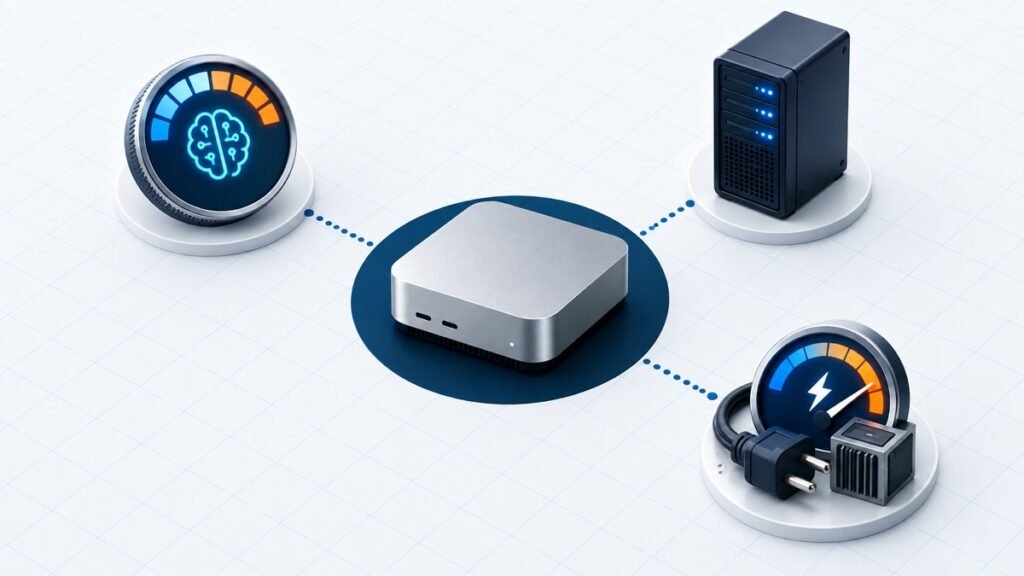
The lowest-cost test starts on hardware you already own. The number changes when you add metered model usage or an always-on server. The breakdown below shows which choice creates each cost.
What OpenClaw Costs by Itself: $0
The source is explicit: OpenClaw is licensed under the MIT License, with no separate enterprise edition under a different license. The official project and governance page also identifies the OpenClaw Foundation as an independent nonprofit.
There is no paid OpenClaw software tier in the current official project model. You install the software and choose the model and hosting around it. Hosted AI assistants package those choices differently, so compare their current rate cards with the complete OpenClaw setup you would run.
“Free software” and “free to operate” are two different claims. OpenClaw still needs model access, and the authentication route determines whether that access is local, subscription-backed, or metered.
Where the Real Cost Comes From
OpenClaw needs an AI model to think. It doesn't ship with one built in. Its current provider directory includes major hosted providers plus local options, so costs vary from one setup to the next.
AI Model Costs: Subscription vs. Pay-As-You-Go
You have two cloud-access options here. Start with the one that matches your existing account and workload.
Reuse supported model access you already have. OpenClaw currently supports ChatGPT/Codex subscription sign-in and a sanctioned Claude CLI reuse path on the same host. Those routes remain subject to the provider's current plan limits and authentication rules. For a long-lived gateway or shared automation, the official authentication guide describes an API key as the most predictable billing option.
Pay per API call instead. If you don't have a subscription, or your usage is going to blow past what a consumer subscription allows, you connect an API key directly and pay based on how much you use it. This is metered by tokens (roughly: chunks of text in and out), and the cost swings a lot depending on which model you pick, since flagship models cost more per call than smaller, faster models. Providers change their per-token pricing often enough that I'm not going to print a number here that'll be stale in a few months. Check the current rate card on whichever provider you pick (Anthropic, OpenAI, and Google all publish theirs) before you commit, and start with a low usage cap while you get a feel for how much a typical day of OpenClaw consumes.
One documented lever for keeping this number down is model routing. The sub-agent guide notes that each sub-agent uses its own context and tokens, and it supports a cheaper model through agents.defaults.subagents.model. Keep the stronger model on the main task and route suitable background work to a less expensive model.
Local Models: The Actual Free Option
If you want the API cost to be exactly zero, run OpenClaw against a local model instead of a cloud provider. The official local-model guide recommends LM Studio or Ollama as the lowest-friction starting routes and also documents more advanced local stacks.
The catch isn't a dollar figure, it's your hardware. Local models run on your own machine's processing power, which means the “cost” shows up as needing a computer capable of running a language model smoothly; think a reasonably modern machine with enough RAM and, ideally, a dedicated GPU or Apple Silicon chip. If you're on an older laptop, local models will either run painfully slowly or not fit in memory at all. This is the trade every local-AI setup makes: pay nothing per query, but you need the machine to back it up.
For a lot of people, the realistic move is a hybrid: local models for simple day-to-day tasks, and a cloud subscription or API key for anything that needs a frontier-level model.
Hosting: Your Own Machine vs. a Dedicated Server
OpenClaw is built local-first. The docs are explicit that it's designed to run “on your own devices,” including desktop and mobile, not on rented server infrastructure by default. If you install it on a computer you already own and just leave that computer on, this part of the cost is $0. You're not paying for anything you weren't already paying for.
A hosting cost appears when you want OpenClaw available 24/7 without depending on your laptop staying powered on and connected. The project documents Docker, Fly.io, and Render deployment paths. The bill is whatever the selected host charges for the resources you configure; check that host's current rate card before deploying. If you've never chosen a host, the same start-small principle from our web hosting guide applies here.
A first test doesn't need an always-on server. Start on your own machine. Move to dedicated hosting only after you confirm the workflow needs to run around the clock without your laptop.
Real-World Cost Scenarios
Numbers mean more with context, so here are three realistic ways people run OpenClaw, from cheapest to most expensive.
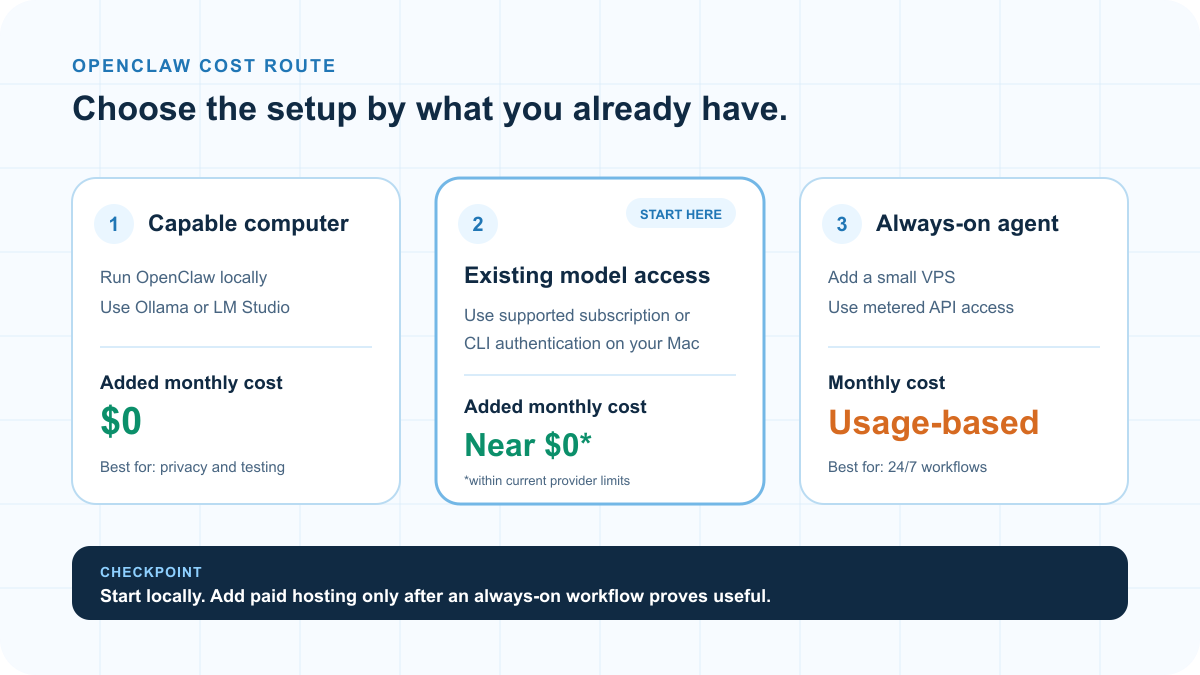
Those layers combine differently depending on whether you run locally, reuse a subscription, or keep the assistant online around the clock.
Scenario 1: The $0 Setup
Run OpenClaw on a laptop or desktop you already own. Connect it to a local model through Ollama or LM Studio. No API key, no subscription add-on, no server. Total added cost: $0. The trade-off is response quality and speed will depend entirely on how capable your hardware is, and you're limited to whatever your machine can run smoothly, not the strongest models on the market.
Scenario 2: The Subscription Reuse Setup
Run OpenClaw on your own machine and use a currently supported subscription or CLI authentication route you already pay for. Marginal added cost: close to $0, up to the provider's current plan limits. This is the fastest path to testing a capable model without opening a second billing relationship, but it is not the most predictable choice for a long-lived server.
Scenario 3: The Always-On, Pay-As-You-Go Setup
Run OpenClaw on a small cloud host so it's reachable 24/7, then connect a metered API key to the model you want. Monthly cost: variable. You pay the host's current rate plus API usage, and the API portion is not capped by the server price. This route fits workflows that must stay available when your own computer is off.
Notice none of these scenarios require you to pay OpenClaw itself anything. Every dollar in that range goes to a model provider or a hosting company you'd choose independently. OpenClaw never takes a cut.
How OpenClaw's Cost Compares to Paid AI Assistants
It helps to compare what each setup bills for instead of relying on a market-wide price range that will go stale.
| Setup | Software cost | What you pay for | Cost basis |
|---|---|---|---|
| OpenClaw (local model) | $0 | Existing hardware and electricity | No model or hosting bill |
| OpenClaw (supported existing access) | $0 | Your current provider plan | Current plan price and limits |
| OpenClaw (host + API) | $0 | Hosting plus metered model usage | Host rate + uncapped usage |
| Hosted AI assistant | Vendor-defined | The vendor's subscription or usage plan | Current vendor rate card |
The difference is control. OpenClaw does not add its own software fee; you choose the model and hosting inputs. A hosted assistant bundles those decisions into the vendor's current plan.
How to Keep Your OpenClaw Costs Low
Set the model and spending rule for the task before it runs on a schedule. Cost control is part of the workflow design, not a generic clip that looks like automation. Use the exact model-routing and provider billing controls in your own setup.
A few practical moves, all grounded in what the software supports rather than generic advice:
- Start with supported access you already pay for. If you have ChatGPT/Codex subscription access or a supported Claude CLI login on the same host, test that route before opening a separate metered API account. Recheck the provider's current limits before relying on it for unattended work.
- Set a cheaper model for sub-agents. The official docs allow background sub-agent tasks to use a cheaper model than the main conversation through
agents.defaults.subagents.model. Use that split when the background task does not require your strongest model. - Run it on hardware you already own before renting a server. Add an always-on host only when the workflow needs to remain available while your computer is off.
- Try local models for routine tasks. If your machine can handle it, route simple, repetitive requests to a local model through Ollama or LM Studio and save your paid API calls for anything that actually needs a stronger model.
- Set the available billing controls on any API account you connect. Review the provider's current limit and alert options before the first unattended run.
Is OpenClaw Worth the Cost?
OpenClaw can be the lower-cost route when you already own the hardware or have supported model access. That advantage disappears if you need new hardware, paid hosting, and heavy metered API usage.
The “free” framing is least useful when you're starting from zero: no supported account, no suitable local hardware, and a need for 24/7 availability. That setup creates a hosting bill plus variable model usage. OpenClaw still gives you control over those inputs, but it does not make them free.
If OpenClaw's specific shape—messaging-app reach, shell access, and broad automation—isn't what you need, read our OpenClaw alternatives breakdown before you commit setup time. Some options are narrower and simpler.
Our OpenClaw tutorial covers the setup these cost scenarios assume. Then use the use-case guide to decide whether the result is valuable enough to justify an always-on model or server.
Frequently Asked Questions
Frequently Asked Questions
Is OpenClaw completely free?
The software itself is MIT licensed with no paid OpenClaw tier. The AI model, hosting, and hardware around it can still cost money. A local model on hardware you already own can keep the added monthly cost at $0.
How much does OpenClaw cost per month?
There is no fixed OpenClaw price. A local model on existing hardware can add $0 per month. Supported subscription or CLI access may add almost nothing within current provider limits. A VPS plus metered API usage creates a variable bill that depends on the host, model, and workload.
Do I need a paid API key to use OpenClaw?
No. OpenClaw supports local models and some subscription or CLI authentication routes. Its documentation still describes an API key as the most predictable option for an always-on gateway, so choose the route that matches your workload and current provider rules.
Is it cheaper to run OpenClaw locally or on a server?
Running it locally is usually cheaper when you already own a capable computer. A dedicated server adds hosting cost in exchange for 24/7 availability, and metered model usage may add a second variable cost.
What's the cheapest way to try OpenClaw?
Install it on a computer you already own, then start with a local model or a currently supported authentication route you already have. Add a metered API key or dedicated server only after the workflow proves useful.
Does OpenClaw have a free trial or a paid upgrade?
OpenClaw itself does not need a trial because the project is MIT licensed and has no separate paid software tier. Providers and hosts around it have their own plans and billing.