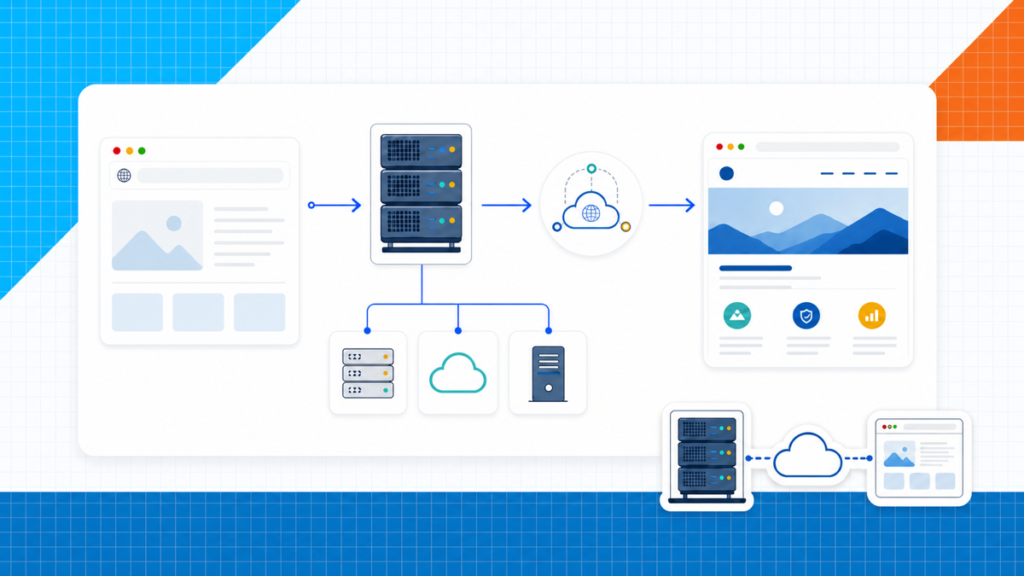
Every website needs a place to live. Your text, images, code, database, and other files have to sit on a computer that stays connected to the internet so people can reach them at any time. Web hosting is the service that provides that computer space.
That is the short answer. The useful answer is knowing what the host does, how a domain points visitors to it, which type of hosting fits a first site, and what you should check before you pay.
This video below explains the domain, website, and hosting relationship on screen.
What is web hosting?
Web hosting is rented space on an always-online server. A server is a computer built to store website files, respond to browser requests, and send the right page back to each visitor.
If you tried to host a public site from a laptop at home, that computer would need to stay powered on, connected, secured, updated, backed up, and ready for traffic around the clock. A hosting company handles that infrastructure for you.
The easiest mental model is a house. The domain is the address, hosting is the land and infrastructure, and the website is the house you build there.
Here’s Dale walking through that relationship:
A domain without a website can point to a parked page. Hosting without a connected domain can hold files, but visitors don’t have a useful address for them. Put the pieces together and the site becomes reachable.
Hosting isn't the website builder. WordPress, Elementor, and other builders help you create or manage the site. Hosting is the server underneath them. Our What is WordPress? guide explains the software layer.
How web hosting works when someone visits your site
A visitor only sees a page load, but several handoffs happen in the background. You don’t need to manage them one by one. It helps to know the path when you are connecting a domain or troubleshooting a site.
- The visitor enters your domain. Their browser asks the Domain Name System, or DNS, where that domain should go.
- DNS points to the hosting server. Records connect the human-friendly domain to the server that holds the website.
- The server receives the request. It looks for the page, image, stylesheet, script, or other resource the browser requested.
- The website software builds the response. On a WordPress site, WordPress can pull content from the database and combine it with the active theme and plugins.
- The server sends the files back. The visitor’s browser renders them as the finished page.
This happens again as the visitor opens another page, submits a form, signs in, or loads an image. A good host keeps those requests available, secure, and fast enough for the job the site needs to do.
What lives in a hosting account
The exact folders and tools vary by platform, but a typical hosting account can contain:
- Website files: HTML, CSS, JavaScript, themes, plugins, and uploaded media.
- A database: WordPress content, settings, users, product data, and other structured information.
- Domain and DNS controls: the records that connect your address to the correct service.
- SSL: the certificate that enables an encrypted HTTPS connection.
- Backups: copies you can restore if an update, mistake, or security problem damages the site.
- Email and mail records: if your plan includes mailboxes or connects to a separate email provider.
- Performance tools: caching, a content delivery network, image tools, and server-level settings.
Web hosting vs a domain vs WordPress
These terms often appear on the same checkout screen, which makes them feel interchangeable. They each have a different job.
| Piece | What it does | Simple analogy |
|---|---|---|
| Domain name | Gives visitors a memorable address and points to the correct service | Street address |
| Web hosting | Stores and serves the files and database from an online server | Land and utilities |
| WordPress | Manages content, themes, plugins, users, and site settings | The system used to build and manage the house |
| Your website | The finished pages and experiences visitors use | The house or storefront |
You can buy the domain and hosting from the same company or keep them separate. If this distinction is the part that has been tripping you up, start with the complete domain name guide, then come back here.
The main types of web hosting
Hosting types mostly describe how server resources are divided, how much control you get, and how much management the provider handles. You don’t need the most powerful option. You need the option that fits the site today with a clear way to move up later.
| Start here Shared | Managed WordPress | Cloud / VPS | Dedicated | |
|---|---|---|---|---|
| How resources work | Many sites share one server | WordPress-tuned hosting with more management | Virtual or cloud resources assigned to your site | One physical server for one customer |
| Technical work | Low | Low | Medium to high | High unless fully managed |
| Cost | Lowest | Higher | Higher and often usage-based | Highest |
| Control | Enough for most first sites | Focused on WordPress workflows | More server and scaling control | Maximum hardware control |
| Best fit | New sites, portfolios, blogs, and small businesses | WordPress sites that value support and convenience | Growing stores, apps, agencies, and traffic spikes | Specialized high-resource workloads |
Swipe to compare more options. Shared stays pinned.
Most beginners should start with shared hosting and upgrade only when the site gives them a real reason.
Shared hosting
Shared hosting places many customer accounts on the same server. The sites share processing power, memory, and other resources, while the host keeps each account separated.
This is usually the best place to start. A portfolio, local business site, new blog, or small store can launch without paying for server capacity it doesn't use.
Beginner fit
The real tradeoff with shared hosting
Why it works
- It keeps the first bill reasonable You share server resources, so the host can spread infrastructure costs across many customers.
- The technical setup is handled A control panel replaces most command-line server work, and the host maintains the physical machine.
- It includes the tools most first sites need SSL, email options, backups, installers, and a domain connection are commonly managed from one dashboard.
- You can upgrade later A first website does not need an expensive server before it has traffic, sales, or complex features.
Where it can fall short
- Resources are shared A busy server or a resource-heavy site can affect performance, depending on how the host manages the account.
- Server control is limited You usually cannot change every server setting or install anything you want at the operating-system level.
- Intro prices can be misleading The low monthly number may require a long prepaid term, and the renewal price can be much higher.
Managed WordPress hosting
Managed WordPress hosting is built around WordPress. The provider may handle more of the updates, backups, caching, security, staging, and WordPress-specific support.
It can be a good fit when the website is important to the business and convenience matters more than the lowest price. Read the plan carefully, because “WordPress hosting” can also be a marketing label on an ordinary shared plan.
VPS and cloud hosting
A virtual private server, or VPS, divides one physical server into virtual environments with assigned resources and more control. Cloud hosting can spread the workload across a pool of infrastructure and make it easier to add resources as demand changes.
Both can give a growing site more room, but the management level matters. An unmanaged VPS expects you to administer the server. A managed cloud platform handles more of that work through a dashboard.
Dedicated hosting
Dedicated hosting gives one customer the use of an entire physical server. It offers the most hardware isolation and control, but it costs more and can require serious server knowledge.
Most beginners don’t need it. Dedicated hosting makes sense for specialized workloads, strict infrastructure requirements, or large operations that know exactly why shared or cloud hosting isn’t enough.
What a web host manages and what you manage
Buying hosting doesn’t mean the provider runs the whole website. The dividing line depends on whether the service is managed, but this is the practical split for a typical beginner plan.
| Usually handled by the host | Usually handled by you |
|---|---|
| Physical servers, networking, power, and data-center security | Pages, posts, products, images, and other content |
| Server availability and account-level infrastructure | WordPress, theme, and plugin choices |
| Control panel, file access, and database tools | Strong passwords, user access, and safe site settings |
| SSL tools and backup systems included with the plan | Confirming SSL works and keeping an independent backup plan |
| Support for hosting and server problems | Fixing design, copy, plugin conflicts, and custom code unless support says otherwise |
A backup feature isn'ot the same as a backup strategy. Know how often backups run, how long they are kept, and whether you can download or restore one without opening a support ticket.
What to look for in a web hosting plan
Ignore the giant feature count at the top of the sales page. Start with the few details that affect whether you can launch, maintain, and move the site.
- Renewal price and billing term: check the total due today, how many months you are prepaying, and what the next term costs.
- Storage and resource limits: find the real limits for files, databases, memory, traffic, or CPU instead of relying on the word “unlimited.”
- Backups: confirm frequency, retention, restoration, and whether backups cost extra.
- SSL: a basic SSL certificate should be easy to enable so the site can use HTTPS.
- Support: check the available channels, hours, and whether the team helps with WordPress or only the server.
- Migration: find out whether the host will move an existing site and what happens to email and DNS during the change.
- Staging: useful for testing updates on a copy before changing the live site.
- Data-center location and CDN: choose infrastructure that can serve your main audience efficiently.
- Refund and cancellation terms: know the deadline, exclusions, and what happens to the domain if it was bundled with the plan.
WordPress publishes a hosting page for people who want a place to begin comparing providers. This clip shows the list itself, including Bluehost and Hostinger:
A listing is a starting signal, not a substitute for reading the plan. The right provider still depends on the website, the term you are comfortable paying for, and how much help you want.
When you're ready to compare actual companies, use our best web hosting services guide. That page handles the provider decision so this guide can stay focused on how hosting works.
How much web hosting do you need?
Start with the smallest sensible plan that includes the essentials for your project. A brand-new site has no reason to pay for an enterprise server in anticipation of traffic it does not have.
- Portfolio or brochure site: shared hosting is normally enough.
- New blog: start shared, optimize images, and upgrade when traffic or resource limits make it necessary.
- Small WordPress store: shared hosting can work at launch, but watch checkout speed, traffic spikes, backups, and support.
- Growing business or agency site: managed WordPress or cloud hosting can be worth it when staging, uptime, and support become operational needs.
- Custom app or specialized workload: choose VPS, cloud, or dedicated infrastructure based on the application instead of a generic website rule.
There is no universal visitor number that tells every site when to upgrade. A simple page and a busy online store can put very different loads on a server at the same traffic level.
Signs it is time to upgrade
- The hosting dashboard repeatedly shows CPU, memory, storage, or bandwidth limits.
- Traffic spikes produce 5xx errors or make important pages unavailable.
- A store slows down during product launches or checkout activity.
- Backups, staging, security controls, or support no longer match the risk of the site.
- You need isolated resources, custom server software, or a specific compliance setup.
How to get hosting and put a website on it
The exact buttons vary by company, but the setup path is usually the same.
- Choose the kind of site you are building. WordPress, a hosted builder, and a custom application can need different plans.
- Compare the complete plan terms. Check the billing period, renewal, limits, backups, SSL, support, and refund policy.
- Create the hosting account. Keep the receipt and account login somewhere secure.
- Connect or register the domain. Update DNS if the domain is held at a different registrar.
- Install the website software. For WordPress, many hosts provide a guided installer.
- Enable SSL and backups. Confirm the site opens with HTTPS and that you know how to restore it.
- Build and test the site. Check the main pages, forms, mobile layout, and performance before sending people to it.
Once hosting, the domain, and WordPress are connected, the dashboard becomes your home base. This clip shows the hosting plan and domain status inside a live WordPress setup.
The host gets the infrastructure online. The next job is building the pages people will use. Follow our step-by-step website guide to go from the hosting account to a finished site, or use the WordPress tutorial if WordPress is already installed.
Web hosting FAQ
Frequently Asked Questions
Do I need web hosting to have a website?
You need a place that can serve the website files whenever someone visits. For a self-hosted WordPress site, that means a web hosting account. A hosted website builder includes hosting inside its subscription, so you still use hosting even when it isn’t sold as a separate product.
What is the difference between web hosting and a domain name?
A domain is the address people type, such as yourbusiness.com. Hosting is the server space where the website files and database live. You normally need both. Read the domain name guide for the address side of the system.
How much does web hosting cost?
Beginner shared hosting is usually the least expensive option, while managed WordPress, cloud, VPS, and dedicated hosting cost more. Compare the total due today, the length of the first term, and the renewal price. The headline monthly rate rarely tells the whole story.
Is free web hosting a good idea?
Free hosting can work for a temporary experiment, but it often comes with storage, bandwidth, support, branding, or domain limits. If the site represents a business, portfolio, store, or serious blog, paid hosting gives you a more reliable place to build.
What type of hosting is best for beginners?
Shared hosting is the usual starting point because it is affordable and doesn’t require server administration. Managed WordPress hosting can also be beginner-friendly, but it costs more. Start with the simplest plan that supports the site you are building.
Can I change web hosts later?
Yes. A WordPress site can be migrated to another host, and many providers offer migration tools or support. Keep your own backups and confirm that your domain, email, and DNS records are accounted for before changing providers.
Does web hosting include WordPress?
Many hosts can install WordPress for you, but hosting and WordPress are different things. Hosting supplies the server. WordPress is the software that manages your pages, posts, themes, plugins, and media on that server.
When should I upgrade my hosting?
Upgrade when you repeatedly hit storage, memory, CPU, bandwidth, or visitor limits; when traffic spikes cause errors; when a store checkout slows down; or when the site needs staging, isolated resources, or a stronger support agreement. Do not upgrade just because a larger plan exists.
Your next step
Web hosting is the always-online server space underneath a website. Your domain points people to it, and software such as WordPress helps you build and manage what they see.
For most first websites, shared hosting is enough. Choose a plan with clear limits, useful backups, SSL, support, and a renewal price you understand. Then move on to the part that matters: building the site. If you still need a provider, compare the options in our web hosting guide. If you already have hosting, start the website walkthrough.