
WordPress maintenance typically costs nothing but your time for a simple DIY site, about $25–$100 per month for basic managed care, and $100–$500+ per month when a business needs active support, development time, or ecommerce monitoring. The number matters less than what happens when an update breaks the site.
Quick answer: A real WordPress maintenance plan should cover tested updates, off-site backups, security monitoring, uptime checks, and a defined amount of support. Hosting alone is not maintenance.
WordPress maintenance cost at a glance
| Approach | Typical monthly cost | Good fit | Main tradeoff |
|---|---|---|---|
| DIY | $0 plus tools and time | Personal or low-risk sites | You own every failure |
| Basic care plan | $25–$100 | Small brochure sites | Limited support time |
| Professional maintenance | $100–$300 | Lead-generating business sites | Scope varies by provider |
| Active or ecommerce care | $300–$500+ | Stores and critical sites | Higher cost for faster response |
Those are planning ranges, not a universal price list. A five-page business site and a WooCommerce store with subscriptions, custom code, and daily orders carry different risk.
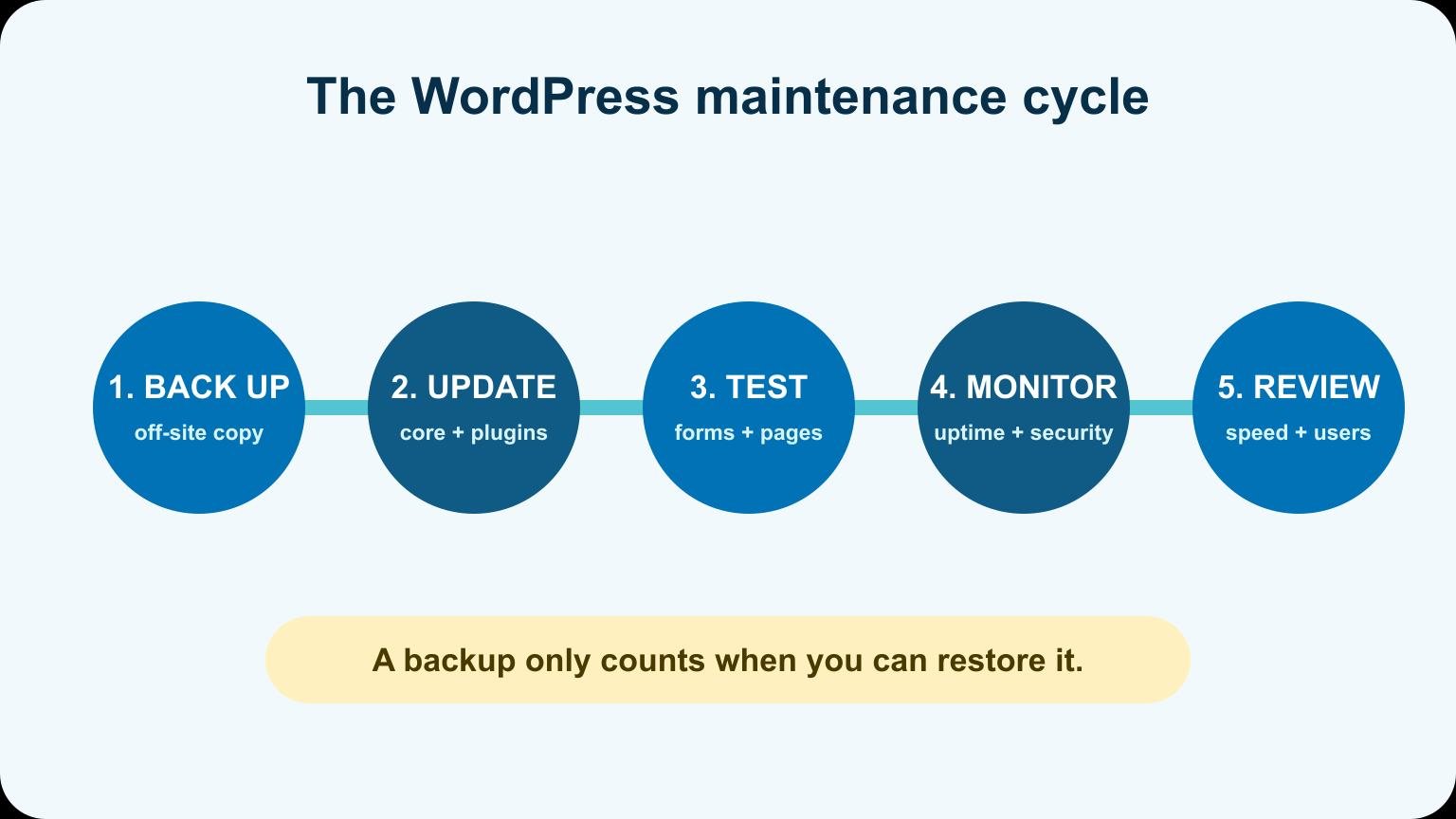
What maintenance should include
- WordPress core, theme, and plugin updates: installed on a schedule and checked afterward.
- Backups: automatic copies stored somewhere other than the same server.
- Security monitoring: alerts for suspicious changes, malware, and vulnerable software.
- Uptime monitoring: an external service notices when the site stops responding.
- Performance checks: obvious slowdowns, failed caching, and oversized files are caught.
- Support: a written response time and a clear amount of included work.
A provider who clicks “update all” once a month and never opens the website is not managing the whole risk.
Why updates need a test
WordPress combines software from several sources. Core, a theme, a page builder, a form plugin, and an ecommerce extension can all update on different schedules. Most updates are uneventful. The one that changes a checkout button, form submission, or mobile menu is the reason maintenance exists.
Back up before updating. Afterward, open the most important pages, submit the main form, check the mobile menu, and test the purchase path if the site sells anything. For a business-critical site, use a staging copy for riskier updates.
DIY maintenance: what it really costs
DIY can be the right choice when the site is simple and you are comfortable restoring a backup. Budget time every month for updates and tests, plus occasional time for a broken plugin or expired account.
| Task | Typical cadence | What to verify |
|---|---|---|
| Backups | Daily or weekly | A restore point exists off-server |
| Software updates | Weekly or biweekly | Pages, forms, and menus still work |
| Security and uptime | Continuous alerts | Notifications reach a monitored inbox |
| Full review | Monthly | Speed, analytics, users, licenses, and errors |
If you are learning the platform, our WordPress beginner tutorial explains where themes, plugins, pages, and settings live. Maintenance is much less intimidating when you understand the dashboard.
Why care-plan prices vary
Site complexity is the first factor. A store, membership site, multilingual setup, or custom plugin creates more combinations to test. Response time is another. Business-hours support costs less than an agreement that requires someone to respond quickly on a weekend.
Included development time changes the price too. Some plans maintain only the existing site. Others include copy changes, landing pages, analytics work, or a block of developer hours. Compare scopes, not plan names.
Questions to ask before buying a plan
- Where are backups stored, and has a restore been tested?
- Do you test forms, checkout, and mobile layouts after updates?
- What happens when an update breaks the site?
- How quickly do you respond to downtime or security alerts?
- How much content or development work is included?
- Who owns the hosting, domain, licenses, and admin accounts?
- What is excluded?
Ask for the answers in writing. “We keep everything updated” does not define responsibility.
When DIY stops being cheaper
DIY stops making sense when downtime costs more than the plan, when you ignore update alerts for weeks, or when you are afraid to touch the site because you do not know how to restore it. A lead-generating site can lose far more than $100 while a broken form sits unnoticed.
By contrast, a small personal site with no revenue and a good managed host may need only a simple monthly checklist. Match the maintenance to the consequence of failure.
What a cheap plan may leave out
A low monthly price can be perfectly reasonable when the provider manages many simple sites with good automation. The problem is assuming every “maintenance plan” covers the same work.
- Restore work: backups may exist, but emergency restoration can be billed separately.
- Premium licenses: the plan may use agency licenses that disappear when you cancel.
- Content edits: software care may not include changing copy, images, products, or landing pages.
- Custom code: debugging a theme or plugin conflict may fall outside routine updates.
- Response time: monitoring does not always mean someone will fix an alert immediately.
- Ecommerce testing: a generic uptime check does not prove checkout, taxes, or email receipts work.
Ask for a written scope and one example of how the provider handles a failed update. The answer tells you more than a long feature list.
Build a realistic annual budget
Multiply the monthly care price by twelve, then add renewals for hosting, domain registration, premium plugins, email delivery, security services, and any expected development hours. Promotional first-year prices can make a new site look cheaper than it will be after renewal.
Keep an emergency allowance for work outside the plan. A brochure site may need only a few hundred dollars available for an unexpected repair. A store or lead-generation site should budget based on the revenue and reputation at risk during downtime.
How to choose between DIY and managed care
DIY makes sense when the site is low risk, you enjoy the work, and you can restore it without guessing. Managed care makes sense when missed leads, failed orders, security issues, or your own time cost more than the plan.
The middle ground is also valid: use managed hosting and automated backups, handle routine content yourself, and keep a trusted developer available for changes. The right setup is the smallest one that gives the business a tested recovery path.
Document that path with our WordPress backup guide and review the access, updates, and hardening steps in our website security guide.
Frequently asked questions
Frequently Asked Questions
Does web hosting include WordPress maintenance?
Some managed hosts include backups, security tools, and automatic updates. They usually do not test your exact forms, checkout, layout, or custom code after every change.
How often should WordPress be maintained?
Monitor uptime and security continuously, make backups automatically, review available updates at least weekly or biweekly, and complete a deeper site check every month.
Can I maintain WordPress myself?
Yes. You need reliable backups, basic troubleshooting comfort, and a repeatable test list. Avoid learning how restoration works during an outage.
Are premium plugins included in a care plan?
Sometimes. Confirm whether licenses belong to you or the provider and what happens to them if the plan ends.
Pay for the risk you actually have
A maintenance plan is not a tax for owning WordPress. It is a way to assign routine work and recovery responsibility. Start with the value of the site, define what must keep working, and buy the smallest plan that covers that risk clearly.